
Recently we had a unique challenge in one of our Marketing Cloud implementation, I am sharing a few of the lesson learned from the journey.
Typically in an email-based subscriber model, the contact key would be the email id and the relationship would be 1: 1 between the contact key and email address.
We, on the other hand, had 8-10 emails per customer. So first things first
-
Identifying the Subscriber Key
The email address cannot be the subscriber key. Neither it can be something which is non-unique. We essentially had two options, getting an external id from the source system which we know is unique or generate a unique id, We went with the propagation of a unique id from the source system.
-
I send my email but it defaults to the same email address
We send 10 emails with 10 different data extensions each filtered with a different email address, so what’s the big problem, The problem is once a subscriber email is sent Marketing cloud puts a default email address for the subscriber and all future sends are using that default email address.
-
User Initiated Send with Data Filter – Not working
-
Automation with Filtered Data Extension -Not working
-
Journey Builder to the rescue
This is where we decided to use Journey Builder and used a feature in data settings where a specific email address can be set for a journey which overrides the default subscriber email address.
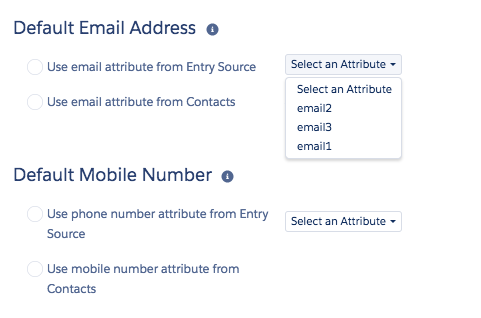
- By activating the journeys and building few decisions splits and Boolean checks we could get the model working where subscribers would receive emails on multiple addresses.
- The same model should be expandable for Phone Numbers as well.
I will keep you updated on how the model scales up with volume.
In the meantime please feel free to share your thoughts and inputs!


 monomyth-a techi'e journey
Leave a comment